

Showing posts with label Symbian S60v3. Show all posts
Showing posts with label Symbian S60v3. Show all posts
I know many people like to make jar bookmarks of their sites. Many bloggers and webmasters use this method to promote their product. Many people know how to make jar bookmark or you can say java launcher. People know to do all the stuff but they don't share it with anyone. When I was in wapka I always helped anyone. My username in wapka was surfit. I always shared the most wanted code never asked for any reward. I am not bragging about myself.

READ MORE
Why Need a Bookmark
If you make a jar or sis bookmark then you can upload it on different public share websites. People will download it and your website will become more popular. Your application will put good impression of your site.Tutorial List
Let me tell you what you going to learn through this tutorial.- Making Symbian Bookmark (.sis)
- Making Dynamic Jar Bookmark
- Making Simple Jar Bookmark
Things you Need
before we start tutorial, let me tell you how many software you need. Read our previous post about 15 apps that we use in mod.- Hack your Mobile
- X-plore (or any other file manager) s60v3
- ZntxHan v2.06 EN s60v3
- JarBoom v3.00 s60v3
- SisEditor
- Get Svg S60v3
- All Editors s60v3
- A Working Brain ^^,
Making Symbian Bookmark (.sis)
Let me start from Symbian bookmark. We need already created bookmark to use it in our project. You can download my blog symbian bookmark here.- Extracting Files - You need to extract my blog bookmark on any specified place. Open SisEditor and extract files.
- Extracted Files - You will find these files in my blog bookmark.
- PakPDA_0xA00158A5_reg.rsc
- PakPDA_0xA00158A5.rsc
- PakPDA_0xA00158A5.mif
- PakPDA_0xA00158A5.exe
- Editing Files - Use zntxHan and open these files and edit my blog name and put yours. Leave PakPDA_0xA00158A5.mif file, because it’s an icon file.
- Text characters must not exceed, this is the most delicate part where people make mistakes. If have left enough space my blog url, you will not feel any problem.
- Deleting old .bak File - Every time you edit file with zntxHan it will create a backup file in same directory. Old file will have .bak extension, you can delete it.
- Making .mif Icon - Now create an icon in paint/Photoshop. Icon size must not exceed 48x48 or 32x32 in some cases. If you make a transparent icon then you must create it .png or .gif extension.
- Converting to .Svg - You have to you use an application named Get SVG. Download it, install it and open it. Now use this app and convert your .gif icon that you created above. Converted file must have .svg extension.
- Converting .Svg to .Mif - Now we will you All Editors to convert .svg file to .mif check these screenshots to understand.
- Final Packing - Now use SisEditor to pack all files. Change necessary data before you pack it. Everything must be handled carefully.
- Installing Bookmark - Congratulation, your bookmark is ready. If everything was ok, then you will not face any problem while installing.
Making Dynamic MakePack Jar Bookmark
Why I used the word dynamic, because in this bookmark you can add multiple menu link. Check this screenshot and download my blog jar bookmark to use it in your project.
- Extracting Files - Use X-Plore and Extract all files into a specified folder.
- Editing Files - Now you will find two .xml files named.
- appinfo.xml
- sarakuj.xml
- Editing Icons - I created all icons for my blog, you can use different icons. Create new icons and put change icon names in sarakuj.xml
- Packing Files - Now Use JarBoom and pack your files. To pack jar file, open JarBoom > options > Jar - File > Compress and locate the MANIFEST.MF file. Your compressed file can be found in C:\JarBoom.
- Installing File - I know you have done everything perfectly. Install packed file and open it.
Making Simple Jar Bookmark
Why I call it simple bookmark because if we open it, it will simply redirected us to our website. It doesn't have any menu, icon etc. You can call it Quick Launcher. I call it Sarakuj Quick Launcher. Hehe. You have to download my Sarakuj Quick Launcher to use it in your project. Let start the tutorial.- Extracting Files - Use X-Plore and Extract all files into a specified folder.
- Editing Files - Now you will find two .xml files named GameMidlet.class. Use znxtHn, open that file and edit this file. Put your site name and replace my site name with your site name.
- Understanding MANIFEST.MF file - Let me tell you what are the important things to edit them in a good way.
Manifest-Version: 1.0
Ant-Version: Apache Ant 1.6.5
Created-By: 1.6.0-b105 (Sarakuj.)
MIDlet-1: Sarakuj,/icon.gif,GameMidlet
MIDlet-Vendor: Sarakuj.com
URL_OPEN: http://www.sarakuj.com/?m=1
MIDlet-Name: Sarakuj
MIDlet-Version: 1.01
MicroEdition-Configuration: CLDC-1.0
MicroEdition-Profile: MIDP-2.0 MIDlet-Info-URL: http://sarakuj.com/?m=1/
MIDlet-Description: One Stop Blog
MIDlet-Delete-Confirm: Delete Sarakuj?
MIDlet-Delete-Notify: Successfully removed.- You can say Author name
- Your site name, it’s used in GameMidlet.class
- Application name after installation.
- Packing Files - Now Use JarBoom and pack your edited files. To pack jar file, open JarBoom > options > Jar - File > Compress and locate the MANIFEST.MF file. Your compressed file can be found in C:\JarBoom.
- Installing File - I know you have done everything perfectly. Install packed file and open it.
Before You Go
Please Note: The applications we used in this project are python application. To run python applications you need Final Python Installer v3.00. If any file doesn’t work after installation, then install it in C:\ drive and try it. Comment below if you face any problem. Thank you :)
I know people have already played Prince Of Persia - Sands of Time on PC. I also enjoyed this game, this game alway heat up my Dell Laptop. I have already finished this game but it took me so many days to finish it. This game needs a person with brain, instead of an empty place in head. I also played Symbian version of this game, that was not good. That was an easy game according to PC. Then some good day i found Game Boy Rom of Prince of Persia Sands of Time. I decided to test it, and i swear i never regret.

This POP game was too difficult and i am still playing it to finish it. You have to pay great attention to get into the situation. You cannot play this tiny game without your full mental presence. It has difficulties that you gonna love. Every level can take you weeks to complete. Specially that bridge, and demon bird level. Let me tell you how you can enjoy this game on your own Symbian mobile.
vBag gives you following instant options.
File
Save: you can save your game at any point. You can save your game at 5 different points/stags at a time.
Load: you can instantly load your saved game any time.
Reset: reset game data.
Priority: set game priority.
Speed: change game speed.
TCache: deal with cache.
Flash: about flash.
Compatibility: about game compatibility according to your mobile.
Sound
Increase of decrease the sound of game.
Graphic
Size: Origin, Full, Landscape (Right), Landscape (Left).
Output: Bitmap/Direct
FrameSkip: skip frames if you have a low memory phone.
Key
Set keys to make your game according to your own choice.
Exit
Finally, here comes the exit option. Incase you have to do your homework or you have to go to toilet, you can exit the game from here. lol. Enjoy.
Install vBag in E:\
After putting the Rom in the folder, open installed vBag. Your game will be shown in this application. Press option and select Play. After the game is started, don't forget to set keys. Select game language, then select New Game. Make your name profile, it will help you to save your game.
If you cannot access any step by pressing jump, because the point is too hight. It means you do not have air jump scroll. Go and find it.
If you see a broken bridge with flying bats, simple use sands of time or dagger to repair the bridge.
If you enter a room and see a huge bird statue. Hit that bird with dagger to bring it to life. After it comes to life, it will hit you. Now its your head ache to kill it and get the Scroll of air jump.
In next levels, you must have to play as Farah after getting the scroll of Farah. Because game doesn't work properly without Farah. It means you have to play two characters at a time. Press 0 or D button to change character.


READ MORE

This POP game was too difficult and i am still playing it to finish it. You have to pay great attention to get into the situation. You cannot play this tiny game without your full mental presence. It has difficulties that you gonna love. Every level can take you weeks to complete. Specially that bridge, and demon bird level. Let me tell you how you can enjoy this game on your own Symbian mobile.
1. Install vBag
Same as N-gage games, these Game Boy Roms have .gba extension. You cannot run them in your mobile without using Emulater. N-gage games work with N-gage installer, similarly GBA games work with vBag. You can run so many roms and download them from web.vBag gives you following instant options.
File
Save: you can save your game at any point. You can save your game at 5 different points/stags at a time.
Load: you can instantly load your saved game any time.
Reset: reset game data.
Priority: set game priority.
Speed: change game speed.
TCache: deal with cache.
Flash: about flash.
Compatibility: about game compatibility according to your mobile.
Sound
Increase of decrease the sound of game.
Graphic
Size: Origin, Full, Landscape (Right), Landscape (Left).
Output: Bitmap/Direct
FrameSkip: skip frames if you have a low memory phone.
Key
Set keys to make your game according to your own choice.
Exit
Finally, here comes the exit option. Incase you have to do your homework or you have to go to toilet, you can exit the game from here. lol. Enjoy.
Install vBag in E:\
2. Prince Of Persia - Sands of Time Rom
Download the file and put it in E:\data\Others\vBagAfter putting the Rom in the folder, open installed vBag. Your game will be shown in this application. Press option and select Play. After the game is started, don't forget to set keys. Select game language, then select New Game. Make your name profile, it will help you to save your game.
3. Tips About Game
I am telling you, this game is so hard to play. Let me tell you some tips about the worst situations of game.If you cannot access any step by pressing jump, because the point is too hight. It means you do not have air jump scroll. Go and find it.
If you see a broken bridge with flying bats, simple use sands of time or dagger to repair the bridge.
If you enter a room and see a huge bird statue. Hit that bird with dagger to bring it to life. After it comes to life, it will hit you. Now its your head ache to kill it and get the Scroll of air jump.
In next levels, you must have to play as Farah after getting the scroll of Farah. Because game doesn't work properly without Farah. It means you have to play two characters at a time. Press 0 or D button to change character.
Some Screenshots


Before You Go
This is high memory game but works fine on s60v3 phone. You can face sudden restart in n73 because of low memory. But it happens in very rare cases. Enjoy...
We all know that blogger.com has updated their website. The older was very good and Opera mini friendly, so many people like me used to blog via Mobile. But now the story is totally changed. New version has highly flash and java script enabled content. When we open it on Opera mini, it looks like a paper is crumbled and only 20% is view able. The only reason why i paused blogging is the updated version of blogspot. But people like me can still manage to post via mobile through several methods. I somehow managed to find some methods to post through mobile.

Let me share the different methods to post on blog by using your mobile phone.
1. Open blogger.com and log in to your account.
2. If you cannot view properly then open settings of Operamini by pressing #+8. Turn on single column view. (in opera mini 4.4 its called Mobile View).
3. Go to the folling link to post a new article. http://www.blogger.com/blog-this.g
4. Here you can post to your blog. Simply give title of your post, write article in textarea and publish.
The bad thing about Operamini 12 is that its RAM eater. It can suck you RAM when you open large web page. It may lead your phone to go hanged. If your smart phone RAM is less then 64MB then don't use it.
After knowing all the little bugs if you still wanna download Operamini 12 then click here.
1. Log in to you blogger acount from PC.
3. Select your blog which you want to set up to post via email.
2. Go to Settings > Mobile and Email you can set up a Mail-to-Blogger address which you will use to send posts via email to your blog. The format of the email address is username.secretword@blogger.com as show in screen shot.

Please keep this email secret or anyone will be able to post on your behalf. Also check the options shown here to publish posts immediately or draft them. Expample
The subjects of your emails will be the titles of your posts, and the body of the emails will be the text. All the image attachments will be published as post images. To avoid any expected bug in text please put #end tag at the end of your post.
READ MORE
Let me share the different methods to post on blog by using your mobile phone.
Operamini 7 and Operamini 4.4 Methods
Operamini is the most popular browser for mobiles. Let me share you simple tricks to use Operamini for blogging.1. Open blogger.com and log in to your account.
2. If you cannot view properly then open settings of Operamini by pressing #+8. Turn on single column view. (in opera mini 4.4 its called Mobile View).
3. Go to the folling link to post a new article. http://www.blogger.com/blog-this.g
4. Here you can post to your blog. Simply give title of your post, write article in textarea and publish.
The only problem with this method is that you cannot Label your post. But you should keep posting by this method and whenever you get access to a computer you can Lable all posts togather.
Operamini 12 s60v3
I really dont use this browser but the best thing about this browser is that it supports flash websites. You can view *.gif images and flash content in it. You may also be able to blog by it although i didn't test it yet.The bad thing about Operamini 12 is that its RAM eater. It can suck you RAM when you open large web page. It may lead your phone to go hanged. If your smart phone RAM is less then 64MB then don't use it.
After knowing all the little bugs if you still wanna download Operamini 12 then click here.
Blogging via Email
Google has already a feature which is called Mail-to-blogger. It can turn your smart phone into a blogging application. All you have to do is set it up.1. Log in to you blogger acount from PC.
3. Select your blog which you want to set up to post via email.
2. Go to Settings > Mobile and Email you can set up a Mail-to-Blogger address which you will use to send posts via email to your blog. The format of the email address is username.secretword@blogger.com as show in screen shot.
Please keep this email secret or anyone will be able to post on your behalf. Also check the options shown here to publish posts immediately or draft them. Expample
The subjects of your emails will be the titles of your posts, and the body of the emails will be the text. All the image attachments will be published as post images. To avoid any expected bug in text please put #end tag at the end of your post.
Blogger Applications (not for Symbian)
Google has launched its offical blogger Andriod application. I dont know why Nokia doesn't launch any blogger application. I am afraid everybody is soon gonna kick Symbian phones.Android Blogger Applications
1. Blogger
2. Blogger-droid
3. Bloggerroid
Before You Go
If you post images in your article by using any image host. Then these images may not be shown in Mobile view of Blogger thumbnails. To avoid this go to google image search and search images by using the following trick. Type this text in search bar.
site:blogspot.com Your keyword here
Replace the underlined text by your keyword. Now google will show only those images which are hosted on blogspot blog. You can use these images to avoid that thumbnail bug i mentioned above.
Mostly useful applications are not signed, and when you try to install them you see a certificate error. So i think that its very important to hack
s60v3 devices. You cannot sign every application, and now you are unable to find cert and key for your mobile. Almost all python applications are
useful, but no signed. In this article, i will try my best to make this method as easy as possible.
I know you've all these questions in your mind. Let me tell you in a easy way with my own theory.
There is a watchman in your s60v3 phone, which stops unsigned files and let go signed files only. The name of the watchman is installserver.exe.
For example check this photo

All we have to do is change the watchman and put our own watchman instead of Nokia's watchman.
To do this, we have to access the locked home of the watchman which is located in C:/bin folder. It's nearly impossible until we make some
changes.
To access the home we have to install Rom Patcher and we have to apply Open4all patch. Open4all is a key to the door of watchman house.
Now i hope you've understood the whole idea.
There are so many methods for this, but let me tell you two best methods.
Download all files in Zip file here
- X-plore v1.58
- Rom Patcher Signed
- .Sys Folder
If Method II stops working, then try Method I.
I am not responsible for any damage, nothing bad gonna happen if you try these methods carefully.
If somehow you did anything wrong then you can reset your mobile phone easily
Don't forget to comment. Cheers :)
READ MORE
s60v3 devices. You cannot sign every application, and now you are unable to find cert and key for your mobile. Almost all python applications are
useful, but no signed. In this article, i will try my best to make this method as easy as possible.
Our Main Goal
What we have to do in whole method? How it actually works?I know you've all these questions in your mind. Let me tell you in a easy way with my own theory.
There is a watchman in your s60v3 phone, which stops unsigned files and let go signed files only. The name of the watchman is installserver.exe.
For example check this photo

All we have to do is change the watchman and put our own watchman instead of Nokia's watchman.
To do this, we have to access the locked home of the watchman which is located in C:/bin folder. It's nearly impossible until we make some
changes.
To access the home we have to install Rom Patcher and we have to apply Open4all patch. Open4all is a key to the door of watchman house.
Now i hope you've understood the whole idea.
There are so many methods for this, but let me tell you two best methods.
Method I
Files needed in this method areDownload all files in Zip file here
- X-plore v1.58
- Rom Patcher Signed
- .Sys Folder
- Download the Zip file i listed above and unzip it with X-plore.
- In this file you will find a folder name .Sys. Copy that .Sys folder and paste it in C:/ drive.
- Restart your phone
- Install Rom Patcher from zip file.
- Open it and apply Open4All RP+ patch
- Now you can access the C:/sys/bin folder [its watchman home as our previous theory :) ]
- Now goto C:/sys/bin folder and replace the installserver.exe (the nokia watchman as our theory) file with our own installserver.exe (our own
watchman as our theory) - Please select the installserver.exe file according to your phone. If you don't know the type, then check the list below
- Restart your phone
- This method is finished, now try to install any unsigned file.
S60v3 SymbianOS 9.1
Nokia 3250 Nokia 5500 Sport Nokia E50 Nokia E60 Nokia E61 Nokia E61i Nokia E62 Nokia E65 Nokia E70 Nokia N71 Nokia N73 Nokia N75 Nokia N77 Nokia N80 Nokia N91 Nokia N91 8GB Nokia N92 Nokia N93 Nokia N93i Samsung SGH-i570S60v3 FP1(v3.1) SymbianOS 9.2
LG KS10 LG KT610 LG KT615 Nokia 5700 XpressMusic Nokia 6110 Navigator Nokia 6120 classic Nokia 6121 classic Nokia 6124 classic Nokia 6290 Nokia E51 Nokia E63 Nokia E66 Nokia E71 Nokia E90 Communicator Nokia N76 Nokia N81 Nokia N81 8GB Nokia N82 Nokia N95 Nokia N95 8GB Samsung SGH-G810 Samsung SGH-i400 Samsung SGH-i408 Samsung SGH-i450 Samsung SGH-i458 Samsung SGH-i520 Samsung SGH-i550 Samsung SGH-i550w Samsung SGH-i560 Samsung SGH-i568S60v3 FP2(v3.2) SymbianOS 9.3
Nokia 5320 XpressMusic Nokia 5630 XpressMusic Nokia 5730 XpressMusic Nokia 6210 Navigator Nokia 6220 classic Nokia 6650 fold Nokia 6710 Navigator Nokia 6720 classic Nokia 6730 classic Nokia 6760 slide Nokia 6790 Surge Nokia E52 Nokia E55 Nokia E71x Nokia E72 Nokia E75 Nokia N78 Nokia N79 Nokia N85 Nokia N86 8MP Nokia N96 Nokia X5 Samsung GT-I7110 Samsung SGH-L870 Samsung GT-i8510 (INNOV8)Method II
- Download Secman from here
- Install it and launch it
- Open option and click on 'install root certificate'
- Your phone will restart after this process
- This method is finished, now try to install any unsigned file.
- This method may not work after multiple use
Before You Go
Method II doesn't work on all phones, but it works perfectly on phones like N73.If Method II stops working, then try Method I.
I am not responsible for any damage, nothing bad gonna happen if you try these methods carefully.
If somehow you did anything wrong then you can reset your mobile phone easily
Don't forget to comment. Cheers :)
Android is really amazing operating system. I think people are tired of symbian now (atleast i am tired :p). I badly miss Android when i see any application and i cannot run it because i don't have Android phone. Well, in this article i am not going to tell you any method to convert Android application into Symbians. Its nearly impossible. I am just going to tell you few hacks to convert your Symbian phone look to Android.
If you don't have an Android phone but you still want to check that how it looks, then follow me. Here goes my own Android phone look, i am really enjoying it.
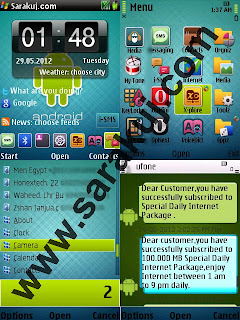
All you need is to do some changes in your phone, install some applications. Lets start the method...
c:\System\Apps\HDesktop_0x2001E8B2\theme_pkg\(here)
Here you can delete those skins which you don't like.
z:\private\10207254 to c:\private\
after this you must have c2z patch applied in your phone. Read this article to get help on c2z patch.
Now all necessery things are done, restart your phone and enjoy the new look of your mobile.
Download this zip file Andriod i-SMS skin and extract it in
C:\data\FreeiSMS\Skins\(here)
To apply this skin, goto Settings > System Settings of you i-SMS and use it.
To apply c2z patch, download Rom Patcher here.
Use HTC Black vHome skin that is used i used in screenshot.
I am not responsible for any damage, but i am using it without any bug. If you have any problem, then please comment.
Cheers :)
READ MORE
If you don't have an Android phone but you still want to check that how it looks, then follow me. Here goes my own Android phone look, i am really enjoying it.

All you need is to do some changes in your phone, install some applications. Lets start the method...
Andriod Theme (change Icons)
This theme is acctually awesome. This theme changes the whole icons of your mobile into Android icons. It can even change the icons of external applications. Its lovely theme and i always use it.vHome v4.50 (change desktop)
The main application to change the desktop of your phone. It is a powerful application which allows you to hold many features. Let me list some features.- Google Search
- Post your tweets directly from your Desktop
- Get weather of your desired city
- 1 row and 2 row icons at Desktop
- 6 or 7 icons in a row
- Use different skins but i recommend you HTC black skin in this project.
- Read rss feeds, more then 100 feeds already added
- Other amazing features - Start menu - Set apps in start menu - Flash light on/off feature - and many more
c:\System\Apps\HDesktop_0x2001E8B2\theme_pkg\(here)
Here you can delete those skins which you don't like.
Grid Patcher (change menu style)
This application will help you to change grid style menu. With this patcher you can set verticle and horizontal number of icons in menu. Set 4x4 menu style with this application. Before you run this application, you must have to copy the folder fromz:\private\10207254 to c:\private\
after this you must have c2z patch applied in your phone. Read this article to get help on c2z patch.
Now all necessery things are done, restart your phone and enjoy the new look of your mobile.
i-SMS Bonus
If you use i-SMS for your sms conversations, then you can download i-SMS Android skin here. Its a cool Android i-SMS skin which you gonna love.Download this zip file Andriod i-SMS skin and extract it in
C:\data\FreeiSMS\Skins\(here)
To apply this skin, goto Settings > System Settings of you i-SMS and use it.
Before You Go
You must hack your mobile because some applications are not signed.To apply c2z patch, download Rom Patcher here.
Use HTC Black vHome skin that is used i used in screenshot.
I am not responsible for any damage, but i am using it without any bug. If you have any problem, then please comment.
Cheers :)
Many people love to mod mobile application. Its really a very pleasure to use any application after moding it. People mod applications for their own benefits. You also can use them in different ways. Mobile moding is far better and easier then PC. We are often unable to find good and related PC softwares to use them. If we find good softwares on computer, then they are limited and trial. On the other hand, you can find every type of application that you want to use in your project. All applications are free to use, and easy to find.

If you are a webmaster, then you must have these applications. You know you can mod different symbian applications with your website title in installation Pop-Up text. After this you can upload them to different uploading sites to increase traffic to your website. But please don't modify copy righted applications, i am not responsible if your website gets problem with it.
I will list some good and most wanted applications on sarakuj.com. If i miss any application, then please don't pinch me. I will try to define each and every application in good way. So if people don't know about any application, it will help them to know more.
To pack any application, press option > Jar - File > Compress. Then locate the MANIFEST.MF file of uncompressed jar application, then name it and save it. You will be notified with a sound after packing is finished. Unpacking is pretty much same.
Move the cursor to where need to be translated and press the OK key, then you can modify the contents.
Press the Dial key to use the on-line translation. If you want to change the types of PYC characters, you need to add s> or u> prefix.
Hexadecimal requires users to identify their Chinese characters, and select the encoded input.
Pen key can be used mark characters, then you can use 9 key to switching shown codes, press dial key to translate, and the C key to delete.
You can find characters from the options, remember to save the document after translating. Software will automatically save a backup which you modify in the same folder. The suffix is "_ bak". When you open the file, you can rename it or delete it.
* # Key can quickly move up down, 5 key is a short key to find the next point. 9 keys in the hexface can switch characters by the tag coding, in the listface to view pyc character types. Dial key to translate the word in the cursor.
Before use the software, you must backup the document, need to distinguish what resources need to translated, because some characters can not be modified, if you do it, the software will not open!
Online translation needs networking, it will produce wap flow. If you open the file by hexadecimal and don't use temporary files, software will not create a backup, all operators will make on the original documents.
It has some additional tools listed below
- edit .db files
- edit .class files
- uncompress and edit .exe files
Unpacking supports SIS-packages from symbian 6-7-8-9. After selecting a file to unpack, information of the selected SIS-package will be displayed on the screen.
I recommend you to "kill" screensaver process from application settings. It may speed up your packing speed. After exit, screensaver will reborn!
Don't mod any copy righted file. Its not allowed (maybe).
Some applications may not work if installed in E: drive. Install them in C: drive and try to open again.
Python applications will never work if python application isn't installed in C: drive.
Power Python doesn't appear in Applications folder. It works in background, you can say it handels python applications secretly.
I tried my best to list all best files, if i didn't list any other application, then please comment below. I will update my list again.
Cheers :)
READ MORE

If you are a webmaster, then you must have these applications. You know you can mod different symbian applications with your website title in installation Pop-Up text. After this you can upload them to different uploading sites to increase traffic to your website. But please don't modify copy righted applications, i am not responsible if your website gets problem with it.
I will list some good and most wanted applications on sarakuj.com. If i miss any application, then please don't pinch me. I will try to define each and every application in good way. So if people don't know about any application, it will help them to know more.
Power Python Final v4.00
A really very very necessary tool to run python applications in mobile phone. It must be installed in C drive or it may not work. Few applications also require to install them in C drive. If any python application doesn't work, then must try it after changing installation drive.All Editor v1.30 EN
This is really amazing and first class application. It has so many tools in it. You don't have to install all different applications. Let me list some tools packed in All Editor.- Easy Mif This tool helps you to open Mif files. Mif are icon format files in Mobile phones.
- Rsc Editor Rsc files are the resource files of Mobile applications. These files can contain text, language etc in them. Symbian applications read these files and we run them on mobile. Without Rsc files, you cannot even open any application.
- Exe Tool Exe files are main parts of application. Every application contain them. You can edit resources in exe files easily.
- Doc2txt This tool may help you to convert .doc files into .txt format. You can use them if you are unable to view Microsoft Office files in mobile.
- Mbm Tool Mbm is another type of image files. Most of the images we see in symbian applications, are based of Mbm files. You can view them or edit them with this tool.
- Zntxhan This tool works in same way as the above too Rsc Editor works. You can edit or translate .rsc files very easily.
- Other There are other usefull tools which i didn't list above. - Clarity PNG - Mask Gen - NulDel - Mif Viewer - FB2html
Class Editor Jar
Basicly its a java or .jar file, it helps to edit .class files in jar applications. Java applications have so many resource files, and these resource files are packed in .class format files. These files are hard to understand and edit, but you can edit them with Class Editor. This is a java application, so it may not be solid.Image Designer v2.50
Its really amazing image editor software. If i say that its a mobile Photoshop application, then i am sure im not wrong. You can enjoy pro image editing in your hands. It has so many useful options, let me tell you few of them.- Open - Save - Save as (.png/.jpg)
- Undo - Redo - Cut - Copy - Paste - Clear
- Select - Select all - Deselect - Invert Select - Magic Select (desired image or face)
- Fonts - Standard - External -Install New Fonts
- Crop - Flip - Rotate - Free Transform - Resize - Displacement
- Filter - Blur - Brightness - Darkness - Invert - Glow etc
- Text Tool - Color Tool - Brush Tool - Spray Tool - Pencil Tool - Stamp Tool and many
JarBoom v3.00
Another great application to Pack/Unpack Java application. If you edit any jar application then you can instantly pack it with Jar Boom without any error.To pack any application, press option > Jar - File > Compress. Then locate the MANIFEST.MF file of uncompressed jar application, then name it and save it. You will be notified with a sound after packing is finished. Unpacking is pretty much same.
KillMe v1.36
This application doesn't help you in moding, but it helps you if any application stucks in your mobile. If your mobile hangs, then simply open Kill Me application and kill that application process. Cool man, it will not really kill your application, it will just shut it down. You can run it again any time.Mif Manage v1.00 EN
Its really great application to edit or open Mif files. You can save any Mif file in to Svg format. You can convert any image in to Svg format. Its works really fast then the above All Editor applications.MobilHex v1.05
Mobile Hex is another cool application to edit rsc files. It also support .exe and .class files. Pretty much fast any easy to handle. It has builtin google translater. Try it.Rom Patcher Signed v3.1
It helps us in very ways. Its a really useful application, and i think the application creater must by awarded by Nobel Prize. You can try many amazing things with it, e.g. Turn off security plates, lock phonebook, logs, etcScreenShot v3.00
Capture any part of your screen any time you want. Capture game screen while playing games on mobile. Set your desired capture key in it, then minimize this application. It will start working, press Capture key and start taking Screen Shots. You can reduce the quality of the captured screen shots.Super Sis
Create sis files, edit them, pack them easily. The biggest feature i like in this application is that you can repack the unpacked .exe files. Most of the applications allow us to uncompress exe file, but not allow to compress them again. So you can use this application to compress exe files again.SyUpack v1.00 EN
Another greate application to edit .exe and .dll files in your mobile. It helps us to understand .dll files in your s60v3 mobile phone.X-plore v1.58
I must say its the world's best file manager for mobile phones. It makes you feel like you are working on your Computer. Zip,unzip, copy, paste, move, hex viewer and editor, sending via BT, hide files, and many other functions. It works very fast thats why i love it.ZntxHan 2.06 EN
Another amazing tool to edit .rsc files. Choose the document which you want to translate and open it, if you use the list means, the software will automatically search resources which can be translated and display them.Move the cursor to where need to be translated and press the OK key, then you can modify the contents.
Press the Dial key to use the on-line translation. If you want to change the types of PYC characters, you need to add s> or u> prefix.
Hexadecimal requires users to identify their Chinese characters, and select the encoded input.
Pen key can be used mark characters, then you can use 9 key to switching shown codes, press dial key to translate, and the C key to delete.
You can find characters from the options, remember to save the document after translating. Software will automatically save a backup which you modify in the same folder. The suffix is "_ bak". When you open the file, you can rename it or delete it.
* # Key can quickly move up down, 5 key is a short key to find the next point. 9 keys in the hexface can switch characters by the tag coding, in the listface to view pyc character types. Dial key to translate the word in the cursor.
Before use the software, you must backup the document, need to distinguish what resources need to translated, because some characters can not be modified, if you do it, the software will not open!
Online translation needs networking, it will produce wap flow. If you open the file by hexadecimal and don't use temporary files, software will not create a backup, all operators will make on the original documents.
It has some additional tools listed below
- edit .db files
- edit .class files
- uncompress and edit .exe files
Smart Sis v2.2.6
This application helps you to edit sis files easily. Just open the sis file, make some changes and save it.Unpacking supports SIS-packages from symbian 6-7-8-9. After selecting a file to unpack, information of the selected SIS-package will be displayed on the screen.
- For symbian 9:
- Information about contents of the SIS-package.
- Detailed information (name, version, date and time of creation, author, vendor).
- Information about certificate(if available)
- For symbian 6-7-8:
- Only information about contents of the SIS-package.
- No detailed information (name, version, date and time of creation, author, vendor).
- No information about certificate.
I recommend you to "kill" screensaver process from application settings. It may speed up your packing speed. After exit, screensaver will reborn!
Before You Go
When you edit any resource file, its size must not exceed then the original size. If original is 8698 bytes and the edited is even 8699 bytes then the application may not work.Don't mod any copy righted file. Its not allowed (maybe).
Some applications may not work if installed in E: drive. Install them in C: drive and try to open again.
Python applications will never work if python application isn't installed in C: drive.
Power Python doesn't appear in Applications folder. It works in background, you can say it handels python applications secretly.
I tried my best to list all best files, if i didn't list any other application, then please comment below. I will update my list again.
Cheers :)
Read the method to change s60v3 fonts here. Why i said fully compatible, because if you use any font and change it with Font Router and restart your phone then it may not show other languages in your mobile. e.g. Urdu, Arabic, Hindi, etc. It shows small boxes when we use any external font. If you already use FontRouter and you left it because of this problem then believe me, you gonna love these fonts. I have already optimized these fonts and now you can enjoy your local language fonts right in your mobile without any damage to to your phone. If you want to know how i managed to optimize these fonts, then please be patient. I will post a tutorials on it soon. Now im giving you seven cool fonts for your Nokia s60v3 mobile.

Thanks for viewing these fonts. These fonts are not mine, i dont own them. But yes, I downloded them from internet and optimized them for Nokia s60v3 Mobiles.
READ MORE
7 Days and 7 Fonts
- Download Capitalee.ttf
Simply cool cute font, i usually apply this font on Friday. You too can use it this friday.

- Download Capitalee Bold.ttf
Same above cute cool font but its not in regular style. Its in bold style. But still you can enjoy it on saturday.
Note: you may not be able to see this font clearly, because its bold and size is small. You still can try it, dont worry.

- Download Hand Writing.ttf I love this font and i mostly use it on Sunday, because of loads of homework. My hand writing is cool but i cannot use my own writing as my font. So i found this font and use it.
- Download Nursury Hand Writing.ttf Here comes the monday font, its hand writing of a child reading in Nursury. Its a good font but not good as above font.
- Download Smalee.ttf Cool small size font for your Tuesday. Its small size font, but you can increase its zoom size in the Font Router settings. Enjoy it.
- Download Stylee.ttf Yupee, i love this wednesday font, its cool stylish font, thats why i named it as Stylee. I love this font, i know you will love it.
- Download WaltDisney.ttf The great thursday font of WaltDisney, i think i must not introduce this because you already know it very well.


Thanks for viewing these fonts. These fonts are not mine, i dont own them. But yes, I downloded them from internet and optimized them for Nokia s60v3 Mobiles.
If you are tired of the same fonts every time in your mobile, then you can easily change your font to your desired one. The other application called Flip Font s60v3 doesn't change fonts of whole mobile phone, so you can try this application called FontRouterMan s60v3. Font Router gives you solution of your all problems. You can Zoom fonts to increase size, and so many other funtctions are available in it. Here is the screenshot of changed font in mobile.

In short you can try following options with this FontRouterMan.

What is Awesome?
Everything is awesome in Font Router, you can change the whole look of your mobile.In short you can try following options with this FontRouterMan.
- Enable/Disable main function of FontRouter.
- Log levels 1 - Fatal 2 - Error 3 - Warning 4 - Info 5 - Debug Please remember to create folder "C:\Logs\FontRouter" so logging will start to work.
- Force to enable anti-aliased bitmap type for TrueType font. (Only available on SymbianOS 7 or above) 0 - System default 1 - Prefer monochrome bitmap type 2 - Force to use monochrome bitmap type 3 - Prefer anti-aliased bitmap type 4 - Force to use anti-aliased bitmap type 5 - Prefer sub-pixel bitmap type 6 - Force to use sub-pixel bitmap type
- Fix font metrics (especially necessary for East-Asian language fonts) 0 - No fix to apply 1 - Simulate the style of built-in Chinese font from Nokia.
- Fix character metrics automatically (for characters not fit the font metrics) 0 - No fix to apply 1 - Fix character metrics automatically
- Disable font file (full path or just file name) DisableFontFile=Z:\Resource\Fonts\S60SC.ccc
- Global zoom ratio By percentage and range of font size to apply zooming to.
- Global chroma adjust By percentage and only avaiable for anti-aliased font.
- Simply download and install FontRouterMan.sis (Open the link and click on download. The size of the file is more then 400 Kb. It may take time to download according to your network speed if you are on mobile.).
- Launch the installed application. When you will open this application, you have to load the font in it. To load you desired font, press right soft key and select open font from the options.
- After locating the font, press left soft key and click on Optimize Font File (it helps your fonts to load and work faster). Then restart your phone to see the instant results.
- Any time if you want to disable this application and want to roll back to default fonts then then simply Disable it from the home menu of FontRouterMan.


Before You Go
- Do not install this application in C drive. Incase if you do anything wrong then you can deal with the problem. Remove the memory card and restart your phone, then insert the memory card and open FontRouter to check what you've done wrong.
- Do not edit the other options if you don't understand them properly. Default options of FontRouter are suitable and best for your phone, you can change then if you understand them.
- I tested it and its working perfectly in my Nokia N78, but still i'm not responsible for any damage to your phone. Try at your very own risk.
Yes you heared me right, now you can easily edit splash screen of Opera Mini Symbian. Its easy to mod opera mini java, but hard to mod symbian Opera mini. All you have to do is Download the Python Software and install it. IT can be done in few easily steps. You don't have to go to the Hex Editor and do all that stuff now, because i know that is not easy for everyone.
Follow my steps
You can edit Opera Mini skin with this Application, if you face any problem then comment here. Enjoy :)
Open your latest Opera Mini with SisEditor and goto File List. Press left side button and select add. It will ask you to add any new file. Add the splash in it, press center key on splash. It will open splash path, give the following path to splash.
!:\system\apps\OperaMini\splash.dat
Then pack your Opera Mini and install to see the magic.
READ MORE
Follow my steps
- Install this application
- Launch this application and press right key to open options, select Splash Maker.
- Select the location of the image to use as Opera Mini Splash
- Then it will ask you these options, select your desired one.
- Now it will process your image and it will create a splash in 3 sec. It will ask you for save location. select location i used E:/
- Now it will save a file named as splash.dat. Move this file to the
E:/system/apps/Opera/
use C if you have installed Opera Mini in C drive.


You can edit Opera Mini skin with this Application, if you face any problem then comment here. Enjoy :)
Packing Opera Mini Splash
If you want to pack this splash in Opera Mini then use SisEditor to pack it.Open your latest Opera Mini with SisEditor and goto File List. Press left side button and select add. It will ask you to add any new file. Add the splash in it, press center key on splash. It will open splash path, give the following path to splash.
!:\system\apps\OperaMini\splash.dat
Then pack your Opera Mini and install to see the magic.
Before You Go
After packing the Opera Mini, it will be unsigned. You have to sign it if your phone is not hacked.
Enjoy The new SisEditor, it is without the annoying Popup text of previous version which was added whenever we edit any application. Now if you edit any application with it, nobody can judge that you used PC or Mobile.
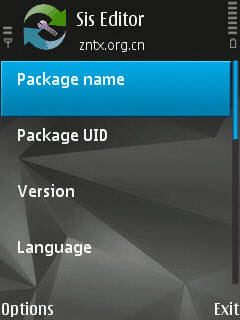
Specific features of the
software:
Cheers
READ MORE

Specific features of the
software:
- It Supports editing sis/sisx file basic information, such as program name, uid, created date,
program version, provider name,
language, target device, the type of
installation and so on. - Its Supports editing sis/sisx file list, including the program components can also be edited.
- Its Supports the new sis/sisx packages.
- It Supports exploring sis/sisx packages, extract, replace its
component, allow adding your files - It can do the following operations on sis/sisx files:
add, delete, replace, extract, property editing (can be four kinds of operation), moved up and down, etc. - It Supports cross-screen operation, you can better see the
specific path of the file. - The program language support, added 100.
- Goal-setting support for all 3rd and 5th edition of the model selection.
Including pre FP1,FP1,FP2, Newer
models as 5800xpress,X6, Sony
ericson, samsung, motorola. Support 5 kinds of the type of installation. - It Can delete certificate and signature
- It Has an inbuilt signer with 2 public certificate
Inserting Installation Pop-Up Text
If you want to insert any desired pop up installation text or installation instruction in file.- Simply open that file.
- Goto file list You will see so many application files here.
- Press left soft key and open options. Click on add, locate the text that you want to use as installation pop up.
- After adding text file, press left soft key and open options.
- Click on 'edit attribute' to set it as pop up text
- Select
- Operation : Display as Text
- Option : Continue button - Now you have added this text file as installation pop up text
- Now press back key, and save this file.
Before You Go
Every file you edit with SisEditor, will become unsigned, even if its signed. So if you don't want to face the issue, please hack your mobile.Cheers
Download
If you love to play songs on Power Mp3 Player in your mobile then you must have a variety of skins in your mobile phone. I am going to give you more then 100 skins for your Power Mp3 Player, download them and enjoy. These Power Mp3 Skins are packed exactly according to your mood. Change them with your changed mood.

Skins List
Here is the Download link of the skins. These skins are packed in .zip format.

Skins List
- Aimp 2 Glamur
- Aimp 2 Mix
- Aimp 2 Silver
- Aimp Black
- Aimp Blue
- Aimp Fox
- Aimp Green
- Aimp Red
- Aimp v2
- AlonMP3
- Anaheim Green
- Anaheim Red
- Anaheim White
- Azenis
- Biff
- Black n Red
- Black Green
- Black v2
- Bugs Bunny Adopted from Bugs Bunny mobile game, i hope you've played it.
- Carbon
- Classic
- Classic Black
- Classic Clear
- Color Window
- Colorfull v1
- Colorfull v2
- Colorfull v3
- Colorfull v4
- Colorfull v5 These color packs are not so good, but you still can check them.
- Crystal
- Ebonite
- Ebonite v2
- Fatali
- Gerb
- Girl Hmmm, i know what you are thinking right now. By the way its a simple sweet and clean skin.
- Girls EQ
- Green Box
- Green iPod You cannot have iPod, no problem. Lets use the iPod skin.
- Grey Metal
- HTC
- HTC v2
- Insomnis
- iPhone
- iPhone2
- iPhone Black
- iPhone Car
- iPhone Light
- iPhone New Cool collection of iPhone skins, don't delete them untill you check all. You will love them.
- iPod Black
- iTunes
- iTunes Black
- Jet Audio
- Jet Audio 2 Adopted from Jet Audio Media Player of Windows, really cool skins.
- LCG Jukebox
- Light
- Light Alloy
- Love
- Mac
- Media Player
- Metal Panels
- Micro System
- Modern
- Movies
- Music
- Musical Fever
- Neon
- Neon Techno
- Night
- NMusic
- Nokia Blue
- Orange Lush
- Over
- BluePeace
- Power
- Power Foo
- Red Impression
- Red Skin
- Royal
- Season IM Orange
- Simple Black
- Simple Skin
- Sonic Stage
- Standard
- Standard 2
- Steel Blue
- The Square Sky
- Theme Red
- Touch Black
- Transformers
- TTPod Old
- Wallkman I loved w810i when i had it. Now i still use walkman skin my Nokia mobile. Its totally same as Sony Ericsson Walkman Music Player.
- White Box
- Winamp
- Winamp AOL Music
- Winamp Modern
- Windows Live
- Windows Media
- Windows Media Player
- Windows Player
- WMV 11
- Xpress Music
- Xpress Music Red
- ZX Modern
Here is the Download link of the skins. These skins are packed in .zip format.
Download Now 7.85 MB
Before You Go
Unzip these skins in skins folder of Power Mp3 Player. Each skin is based on 6 different color themes. It means you can use each skin 6 times with different themes. So if you download these skins then you will have 103 x 6 = 618 Skins of your Power Mp3 Player Skins in your hand. You can change the theme from the option menu.
I have N78 and i implement this idea when i was changing my menu style to grid menu 4x5. Actually 4x5 grid menu patch doesn't work in N78. If you apply it, then you can not open your menu again. First i thought what the hell should i do now?
I wanted to open Rom Patcher to remove that 4x5 grid menu patch to get my menu back so i got an idea to open Rom Patcher without opening menu. Let me share it with you.

Requirement
Security plates must be turned off to use this trick. :)Now open xplore and goto
C: / sys / bin

You will see so many files in this folder, simply open you desired application by clicking on it.
For example
OperaMini.exe for Opera
IDesigner_0x011acc34.exe for Image Designer
JARBoom_0x130487ef.exe for Jar Boom
MobilHex_0xa0005346.exe for Hex Editor
and so...
You can also use SmartWork Space to put so many icons on your standby screen.

I saw so many Users complaining about Free iSMS registration problem. I myself was so upset about it, one day my brother told me that he is using iSMS and he didn't face Registration problem. So i suddenly thought why its happening to me only? I googled about it and saw so many people, i felt that i am not alone :). So i decided to do something by my own. I tried only one method and it worked.

Let me tell you what i did. I simply took my brother's mobile from him and copied two files from his mobile.
C: / Data / FreeiSMS / FreeiSMS_0xXXXXXXXX.dat
C: / Data / FreeiSMS / FreeiSMS_0xXXXXXXXX.db
XXXXXXXX can be different in different version of iSMS.

Then i sent both files to my mobile and i pasted both files in
C: / Data / FreeiSMS /
Then i opened Free iSMS > Options > Login

Then i tried to Register it with my mobile number or e-mail and i succeeded. Now i am so happy that i am still using it and i am loving it <3. Here is the proof, i mean preview of my iSMS.

This is the best Chinese application for SMS, it has so many features which are so unique and amazing. iSMS AllInOne Beta is a new and improved application with rewitten interface UI, chat conversations, resulting in a more smooth scrolling effect. Free-iSMS displays your messages in threads, it can schedule your messages, and it can send fake messages to your inbox too. The fake messaging option of Free-iSMS works much better than Fake Messages and ActiveFile. Let me tell you about features of new iSMS (beta).

It shows SMS in threaded view same as iphone shows. You can delete, reply, forward on the same place.

This application shows the Avatar of the SMS sender, you can set Avatar of your contacts from Menu > Contacts > Options > Set Image. Set desired image of the contact to show it in iSMS.

This application can show smiley in icon form, you can send so many amazing smileys in your SMS.

Free iSMS can restore your messages, you can create a backup of your messages, you can send message on any time with scheduled sms, you can send flash message, you can send fake sms, you can notify fake messages in your mobiles and much more.

Free iSMS support unlimited skins, you can download so many skins from internet. Even you can create you own skins (if you can :p).

Short Brief.
- Private Lock for SMS
- Stick favorite SMS on Top
- SMS Counter according to months
- New skin format support, more easily create a personalized love messages.
- Simplified skin production, installation and management functions, the skin used to choose the way coverflow, the skin effect of real time preview, dynamic presentation.
- Chat dialogue interface add a picture expression support, send messages to visualize bubble selection and insertion.
- Contact Interface Add “to add, clear picture” function, support jpg, png and other *** image formats, picture settings and contacts within the contact head independently, and supports batch import picture.
- Added functionality to ignore iPhone style tips: 3rd edition phones can be prompted by the # key closed, 5th Edition mobile phone users can click the upper right corner of the red cross tips off tips, but does not change the state of new information.
- For 5th Edition Touch platform, the contact interface, new gesture support: contact entries on the left in the program contacts the right plan can be labeled and unmark operation.
New Function:
- iSMS add fetion function, It will convenient for the user to use.
- iSMS support using fetion number to login fetion function.
- Auto start for fetion function:fetion function will auto start after you setting fetion configurations.
- Double click will insert expression on flatform Symbian S60 5th and Symbian^3.
User feeling optimization:
- Function of start-flash-screen in iSMS have been moved to "about" option.
New platform adaptation:
- Correct the problem that fetion function can't be used on platform Symbian^3.
- Correct the problem that when you connect to wap that ask you to choose access point many times on platform Symbian^3.
- Correct the problem that iSMS don't support secret contact person function on platform Symbian^3.
This application can work on these mobiles.
Nokia: Symbian S60 3rd full support
Like: 3250 / 3250XM / 5320XM / 5500 /5700 / 5700XM / 5730XM / 6110N /6120 / 6120C / 6121C / 6122C/6124C / 6210N / 6210S / 6220C /6290 / 6650 / E50 / E51 / E52 / E60 /E61 / E61i / E62 / E65 / E66 /E70 / E71 / E90 / N71 / N73 /N75 / N76 / N77 / N78 / N79 /N80 / N81 / N82 / N83 / N83i /N85 / N91 / N92 / N93 / N93i /N95 / N95 8GB / N96
Symbian S60 5th, Symbian ^ 3 full support
Like: 5230 / 5232 / 5233 / 5235 / 5250 /5530XM / 5800 /5800i / 5800w / 5802XM /C5-03 / C6 / N97 / N97i / N97 mini / X6 /C6-01 / C7 / N8
Samsung: S5200c、i400、G818E、L878E、i520、i458、M800 0、i560、i550、 i450、i408、SGH-i570、GT- B5210U、i7110、SGH-i408
READ MORE

It shows SMS in threaded view same as iphone shows. You can delete, reply, forward on the same place.

This application shows the Avatar of the SMS sender, you can set Avatar of your contacts from Menu > Contacts > Options > Set Image. Set desired image of the contact to show it in iSMS.

This application can show smiley in icon form, you can send so many amazing smileys in your SMS.

Free iSMS can restore your messages, you can create a backup of your messages, you can send message on any time with scheduled sms, you can send flash message, you can send fake sms, you can notify fake messages in your mobiles and much more.

Free iSMS support unlimited skins, you can download so many skins from internet. Even you can create you own skins (if you can :p).

Short Brief.
- Private Lock for SMS
- Stick favorite SMS on Top
- SMS Counter according to months
- New skin format support, more easily create a personalized love messages.
- Simplified skin production, installation and management functions, the skin used to choose the way coverflow, the skin effect of real time preview, dynamic presentation.
- Chat dialogue interface add a picture expression support, send messages to visualize bubble selection and insertion.
- Contact Interface Add “to add, clear picture” function, support jpg, png and other *** image formats, picture settings and contacts within the contact head independently, and supports batch import picture.
- Added functionality to ignore iPhone style tips: 3rd edition phones can be prompted by the # key closed, 5th Edition mobile phone users can click the upper right corner of the red cross tips off tips, but does not change the state of new information.
- For 5th Edition Touch platform, the contact interface, new gesture support: contact entries on the left in the program contacts the right plan can be labeled and unmark operation.
New Function:
- iSMS add fetion function, It will convenient for the user to use.
- iSMS support using fetion number to login fetion function.
- Auto start for fetion function:fetion function will auto start after you setting fetion configurations.
- Double click will insert expression on flatform Symbian S60 5th and Symbian^3.
User feeling optimization:
- Function of start-flash-screen in iSMS have been moved to "about" option.
New platform adaptation:
- Correct the problem that fetion function can't be used on platform Symbian^3.
- Correct the problem that when you connect to wap that ask you to choose access point many times on platform Symbian^3.
- Correct the problem that iSMS don't support secret contact person function on platform Symbian^3.
This application can work on these mobiles.
Nokia: Symbian S60 3rd full support
Like: 3250 / 3250XM / 5320XM / 5500 /5700 / 5700XM / 5730XM / 6110N /6120 / 6120C / 6121C / 6122C/6124C / 6210N / 6210S / 6220C /6290 / 6650 / E50 / E51 / E52 / E60 /E61 / E61i / E62 / E65 / E66 /E70 / E71 / E90 / N71 / N73 /N75 / N76 / N77 / N78 / N79 /N80 / N81 / N82 / N83 / N83i /N85 / N91 / N92 / N93 / N93i /N95 / N95 8GB / N96
Symbian S60 5th, Symbian ^ 3 full support
Like: 5230 / 5232 / 5233 / 5235 / 5250 /5530XM / 5800 /5800i / 5800w / 5802XM /C5-03 / C6 / N97 / N97i / N97 mini / X6 /C6-01 / C7 / N8
Samsung: S5200c、i400、G818E、L878E、i520、i458、M800 0、i560、i550、 i450、i408、SGH-i570、GT- B5210U、i7110、SGH-i408
Download It
I have great interest in Symbian devices, infact i badly love them. You can change your S60v3 device to a PC by instally variety of Softwares. My phone can do everything which i usually try on a PC. Its just because f my Symbian phone.

Memory Problem
- People are often worried about the mobile memory of Phone, because it gradually decreases if you install so many applications (even in memory card).
- If you got same problem then you can try my following methods to get your little MB back. :)
- Open Rom Patcher and enable Open4all patch then open any file manager and go to
C:/ Private / 1020724
you will find a file named "reserved". Simply delete it and get few phone memory back. (path maybe changed in some phones, you can check all folders here) - Then go to C:/ System and open that folders, you will see so many file/folders here. All you have to do is delete folders/files of those applications which are already uninstalled from your device. (be careful, don't remove any system file)
Java Backup
- When we downlnad any Java file in .jad extension. The file will install directly without any backup. I am going to tell you how to find backup file.
- Simply go to C:/ Private / MIDlets and you will find the installed file folder here. Copy the .jar file in it. Yupee we got backup file. :)
Unable to Send protected item
- If you see this error message then simply renamed that file and remove extension, after sending change the extension again.
- For example: change spiderman.jar to spidermanjar and send it.
More Simple Tips and Tricks
All Tips / Tutorials / Tricks / Mods / for S60 Cellphones here -updatedTip 1 : Do u know how to use the edit button (abc or pencil button)? Heres how... In the inbox for example; u wanna delete multiple sms, simply hold the edit button,scroll down, and then, press c to delete the marked sms. The edit button can also b used to copy and past text in sms, simply hold it and scroll across, choose copy. Pretty good for placing song names in ngages.
Tip 2 : Shit happens, on a smartphone, its inevitable u do something wrong, and tis calls for a format of fone. To format the fone, press *#7370#, then enter the lock code, which is the sec code of the fone. NOTE: batt must b full, else if format is disrupted by low batt, consequences will b disatrous.
I heard the code *#7780# works too, pretty much the same i tink. for 6600 users, to format the fone, theres an alternative way. Press and hold <3>, <*> and Call (Send) buttons, then power on fone, keep holding on the 3 buttons, till u come to a format screen. This method ONLY works on 6600, and need not enter the sec code. BUT sec code would be reset to default 12345.
Tip 3 : TO NGAGE USERS; Did u know u can install .sis files simply using the cable given? Juz plug it in, place the .sis file anywhere on e: (the mmc), not in any folders, root of e:, disconnect, then look for it in manager.
Tip 4: Save on battery and system memory being used by regulary checking the task manager which can be accessed by holding down the menu button!!
Tip 5: Type *#06# to display your IMEI serial number, very valuable for the unlocking your phone to other sim card Tip 6: Type *#0000# to view which firmware version you are running
Tip 4a: Set the screen saver to a short time out period to prolong battery life.
Tip 4b: Avoid restarting the phone, or repeatedly turning it on and off. This helps increase battery life.
Tip 7: If you would like to avoid being "blue jacked", keep bluetooth turned off, or set your phone's visibility to hidden.
Tip 8: Don't want to carry a watch and a phone? Set the screen saver to show date and time, then you can ditch the watch.
Tip 9: Save memory when installing apps, by installing over bluetooth. This can be done using the nokia phone suite and a bluetooth serial connection.
Only works with .SIS files, so java still has to be sent to the phone, but will save space when using .SIS files.
Tip 10: Operator logos Use a filemanager like FExplorer or SeleQ to add the folders: "c:/system/Apps/phone/oplogo". Add a .bmp picture to folder "oplogo" and restart your phone! The .bmp picture size needs to be: 97 x 25 pixels
Tip 11: Check if the recepients phone is on Delivery reports or Type *0# your message in the message composer window space then write your message, the recipient will not see the star zero hash bit - just the message When they read it it will relay a message back to your fone showing the time they recieved it. (haven't yet tried it myself though)
Tip 12: BlueJacking First up, you need to know what Bluetooth is. There are lots of types of modern devices that incorporate Bluetooth as one of their many features. PDAs, mobile phones and laptops are a few of these modern devices.
Bluetooth means that Bluetooth enabled devices can send things like phonebook/address book contacts, pictures & notes to other Bluetooth enabled devices wirelessly over a range of about 10 metres. So, we've got past the boring part. Now, using a phone with Bluetooth, you can create a phonebook contact and write a message, eg. 'Hello, you've been bluejacked', in the 'Name' field. Then you can search for other phones with Bluetooth and send that phonebook contact to them.
On their phone, a message will popup saying "'Hello, you've been bluejacked' has just been received by Bluetooth" or something along those lines. For most 'victims' they will have no idea as to how the message appeared on their phone
#13: While you are viewing a picture in your phone's gallery, press one of these shortcut keys (definitely works on 6600, not sure about other symbians)
1 - turn image anticlockwise 3 - turn image clockwise * - toggle on/off of full screen 5 - zoom in 0 - zoom out #15 u can select all files in a folder by selecting THE folder and copy it then paste it somewhere. However u need to make a new directory.
Fexplorer wun let u copy that folder together. Well seleQ can mark files to copy but it really takes time! #16: A soft and Hard reset A Soft-reset - the process of resetting all the settings of the phone to the factory default! No applications are deleted!
A Hard-reset is like formatting a drive! It does format the memory. Everything that has been installed after the first use of the phone is deleted! It will recover the memory of the phone to the state you purchased it! It is done by inputing the following code: *#7370#
NOTE: The battery must be full or the charger has to be connected to the phone so that it does not run out of power and make the phone unusable.
#17: Formats of images supported ones: JPG UPF GIF87a/89a WBMB MBM TIFF/F PNG EXIF How to copy & paste text in your Nokia 3650:
Press and hold the pencil key and select your text using the scroll key. Left function key will change to 'Copy'. Press it to copy the selected text to clipboard. You can paste the clipboard contents the same way: press and hold the pencil key and press 'Paste'. Or, press pencil key once and select 'Paste'. Press and hold the Menu key to open the application switching window, where you can *duh* switch between applications.
If a program hangs and you can't shut it down, select the application in the application switching window and press 'C' to kill it. It's also a faster way to exit programs.
Turn on/off the "click" sound made by the camera by selecting the 'Silent' profile or by turning warning tones on/off:
Menu > Profiles > "select your activated profile" > Personalise > Warning tones > On/Off. (This also effects the sound of Java games and apps).
To change background image go to:
Menu > Tools > Settings > Phone > Standby mode > Background image > Yes > "choose an image". The best size for background images is 174x132 pixels. Only got blue, green and purple in your 3650 colour palette?
This free app adds 3 more colours: Palette Extender. Display an image when someone's calling: Menu > Contacts > "select a contact card" > Options > Edit > Options > Add thumbnail > "choose an image".
Add a personal ringing tone to a contact: Menu > Contacts > "select a contact card" > Options > Open > Options > Ringing tone > "choose a ringing tone".
Delete all messages from your Inbox at once:
Menu > Messaging > Inbox > Options > Mark/Unmark > Mark all > Options > Delete. Send or hide your caller ID:
Go to: Menu > Tools > Settings > Call > Send My Caller ID > 'Yes', 'No' or 'Set By Network' to follow the default settings of your home network. If you often copy large files to your MultiMedia Card, I recommend a card reader. E.g. With a card reader it takes only 12 seconds to copy a 10 MB file!
Record the sound of a phone call using the (sound) Recorder. Menu > Extra's > Recorder > Options > Record sound clip. Note: short beeps are audible during call registration. But there is a 60 second limitation so if you want unlimited sound recording get this app: Extended Recorder.
While writing text, press "#" to switch between upper and lower case and Dictonary on/off (predictive text input). Press and hold "#" to switch between Alpha mode and Number mode. Keyboard shortcuts for zooming and rotating images in Images: 1 = zoom in, 0 = zoom out, press and hold to return to the normal view. 2 = rotate anticlockwise, 9 = rotate clockwise, * = full screen. In standby mode, press and hold the right soft key to activate voice dialling.
To add a voice tag to a phone number, open a contact card and scroll to the phone number and select: Options > Add voice tag.
You can customize both soft keys located below the screen (in standby mode): Menu > Tools > Settings > Phone > Standby mode > Left/Right selection key > "select an application".
In standby mode. Press scroll key center (joystick) to go directly to Contacts. In standby mode, press and hold 0 to launch your wap home page.
In Menu or any subfolder, press numbers 1 - 9 to start the application at that location. 123 456 789 In standby mode, 45# + dials the number on your sim in memory slot 45. 50# + dials slot 50 and so on. If you have your keylock activated just press the on/off button to turn on your backlight to look at the time when it's dark without having to unlock the keypad. Never, ever, in your whole life, install WildSkinz on your Nokia 3650!!! WildSkinz screws up the whole 3650 system.
To check your current firmware version simply type *#0000# on main Phone screen. · How to check your IMEI (International Mobile Equipment Identity)? Type *#06# on main Phone screen. Start up in Safe Mode so no 'auto start' apps will be running: To make sure that no memory-resident programs start when you reboot your phone, hold down the pencil key when you turn on the phone and hold it on untill you have to enter your PIN code.
(When you have trouble booting up the phone with the MMC in it because it got corrupted for some reason, this trick will almost always let you boot up the phone so you can remove the latest installed app which might have caused the problem or if your phone is "unrepairable" you can still back up your important data before you do a format.)
Q: How to totally format your Nokia 3650 and remove all installed applications, user files and restore all settings to default like it's new out of the box? (OEM apps won't be deleted like Camera and RealOne Player).
A: First Format your MMC: Menu > Extras > Memory > Options > Format mem. Card > Yes. Note: It is very important to format your MMC before you format your phone! Then format your phone by typing *#7370# on main Phone screen. Phone will ask: "Restore all original phone settings? Phone will restart." Press 'Yes' and enter your Lock code (default is 12345).
Tip: Formatting takes several minutes so you'd better connect your Nokia 3650 to a charger to ensure that your battery doesn't get empty in the middle of formatting. Note: All your created acces points and mailboxes will be lost so take a note of them. And all application settings will be reset.
E.g. In Camera, image quality is set back to normal and memory in use is set back to phone memory. And also in Messages, memory in use is set back to phone memory, etc. Also backup your contacts with PC Suite or a program like Contacts Manager. To reset your wallet, should you forget your code, Type in: *#7370925538# this will reset the wallet code, the wallet contents will be deleted.
How to free more RAM on your phone
>>> Method 1: Flight mode: Put your phone in "Flight mode" with Psiloc System Tools. Install System Tools, open it and select "Flight mode". This way you can restart the phone without your SIM card so there will be no running phone tasks in the background.Now you can have up to 3,5 MB of free RAM! Note: ironically enough, Flight mode doesn't work when Smart Launcher is installed, at least in my case. But i've also heard several reports of people who have both apps running without any problems.
>>> Method 2: Smart Launcher trick: Install Smart Launcher and open it. Go to Options, Settings and put Launcher ON. Now plug in your charger and switch off your phone.
Wait untill the battery meter appears and short press the Menu button (don't hold). The menu should appear and now you can have 3,5 to 4,5 MB free RAM! (Hold Menu button to check RAM).
The trick is that with the charger plugged in, the phone must get a minimum software support for charging, even when the phone is switched off. And somehow Smart Launcher has still got it's shortcut running and that's the Menu button.
So when you press the Menu button, you go directly to the Menu without any other phone tasks running in the background so you trick the phone and you have more free RAM! Note: when you unplug the charger, the phone will switch off.
>>> Method 3: Menu : This method I found it by myself, it frees a little about 100~200 KB but I guess it's useful sometime Close your menu not by selecting the right selection key "exit", or pressing the menu key another time, they only hide the menu app but do not close it, to close it select the left selection key "option" and scroll down and select "exit"
So when you open an app need smore ram reopen menu and close it, it's useful when play low bit rate video in realplayer paradis.
This is how to check MMC (memory card) unlock cord or password. For who lost or dont remember with the password after locked and almost crazy with it.
Mmc pasword remove
Firstly: You need to hack your phone. Because some model of phone can’t see the hidden directory (folder). After hack you can organize the hiddden or protect file. (Check how to hack symbian phone)Open with X-Plore file browser Go to “C:\” (phone memory) than find “sys” folder, find next “data” folder, search the file name “mmcstore” and you MMC password located at here.
XMPL= C:\sys\data\mmcstore\ After that copy the “mmcstore” file to other directory on “E:\” and rename them to “mmcstore.txt”.
Now open this file with “DEDit app” or you can press botton (8) ifyou use X-Plore app. You will show what the password you put.
HIDE UR PERSONAL DATA..IMAGES,,,ETC BY USING X-PLORE
U CAN HIDE UR PERSONAL DATA..IMAGES,,,ETC BY USING X-PLORE JUST FOLLOW THE STEPS--1-SEARCH FOR "_PAIbTN" FOLDER IN YOUR X-PLORE.
2-THAN MOVE UR DATA TO THIS FOLDER...
3-THIS FOLDER U WILL FIND IN IMAGES FOLDER...
IN this WAY U CAN HIDE YOUR DATA,,,& EVEN YOUR PICS FROM GALLERY VIWER ....
TRICK to RECORD from VISUAL RADIO 100% WORKING!!!!
You must do the steps I write:1. Install Ultimate Voice Recorder
2. Run Visual Radio via loudspeaker and set the biggest volume for best result
3. Run Ultimate Voice Recorder, for best result choose the wav format
4. Press record and set the biggest volume
5. Now you'll find it very easy to record audio from Visual Radio Basically
Ultimate Voice Recorder is great recording application which can record every sound, not only sound from Visual Radio or internet radio but every single sound that your phone emanates and sound comes around your phone.
That's why, before recording make sure your surrounding is quite. I don't know with another recorder, maybe they can record from radio too. I also attach a recorded files from Visual Radio in wav format as a sample. Have a try! Hope that this will help people a lot.
Watch TV with RealPlayer on Os 9.1/9.2
Most people know that you can watch live TV with Vimio Live TV but only with 5 channels. but here I would like to introduce a method without any app to be installed jus with the help of real playerPLEASE NOTE:
YOU WILL NEED A UNLIMITED GPRS PLAN TO DO THIS.
Guide:
Go To Menu -> Application Software -> Realplayer -> Options -> Settings -> Open the link -> Open Network -> The default access point will be set to wap over GPRS or WIFI or anyother Options -> Advanced Change EGPRS to 80.00 kbps bandwidth Then return Open Gallery -> streaming links Finally in streaming links open new link and save the address given below whch ever you want.
Channels
Shanghai Sportsrtsp://211.136.165.58/sports_m.sdp
CCTV News Channel
rtsp://211.136.165.58/cctvnews_m.dsp
Orient Satellite TV
rtsp://211.136.165.58/yule_m.sdp
Oriental music rtsp://211.136.165.58/gunbo05_v_m.sdp
Radio rtsp://211.136.165.58/radio_101_m.sdp
CCTV-1 Integrated / news rtsp://218.28.0.14:554/encoder/cctv1
CCTV-2 economic / life / service
http://www.era-cn.com/tv/tv/hyds/wm/cctv2_400.asx
CCTV-3 Entertainment
rtsp://61.156.17.196/encoder/tv1
CCTV-4 The international channel
mms://4.19.71.20/cctv4b
CCTV-5 sports
http://www.era-cn.com/tv/tv/hyds/wm/cctv5_510f.asx
CCTV-7 children / military / agriculture
http://www.era-cn.com/tv/tv/hyds/wm/cctv7_400.asx
CCTV-8 Television
http://www.era-cn.com/tv/tv/hyds/cctv8_450.ram
CCTV-9 news
http://www.era-cn.com/tv/tv/hyds/wm/cctv9_400.asx
CCTV-10 science / education
http://www.era-cn.com/tv/tv/hyds/wm/cctv10_400.asx


