

Showing posts with label Symbian S60v5. Show all posts
Showing posts with label Symbian S60v5. Show all posts
Yes you heared me right, now you can easily edit splash screen of Opera Mini Symbian. Its easy to mod opera mini java, but hard to mod symbian Opera mini. All you have to do is Download the Python Software and install it. IT can be done in few easily steps. You don't have to go to the Hex Editor and do all that stuff now, because i know that is not easy for everyone.
Follow my steps
You can edit Opera Mini skin with this Application, if you face any problem then comment here. Enjoy :)
Open your latest Opera Mini with SisEditor and goto File List. Press left side button and select add. It will ask you to add any new file. Add the splash in it, press center key on splash. It will open splash path, give the following path to splash.
!:\system\apps\OperaMini\splash.dat
Then pack your Opera Mini and install to see the magic.
READ MORE
Follow my steps
- Install this application
- Launch this application and press right key to open options, select Splash Maker.
- Select the location of the image to use as Opera Mini Splash
- Then it will ask you these options, select your desired one.
- Now it will process your image and it will create a splash in 3 sec. It will ask you for save location. select location i used E:/
- Now it will save a file named as splash.dat. Move this file to the
E:/system/apps/Opera/
use C if you have installed Opera Mini in C drive.


You can edit Opera Mini skin with this Application, if you face any problem then comment here. Enjoy :)
Packing Opera Mini Splash
If you want to pack this splash in Opera Mini then use SisEditor to pack it.Open your latest Opera Mini with SisEditor and goto File List. Press left side button and select add. It will ask you to add any new file. Add the splash in it, press center key on splash. It will open splash path, give the following path to splash.
!:\system\apps\OperaMini\splash.dat
Then pack your Opera Mini and install to see the magic.
Before You Go
After packing the Opera Mini, it will be unsigned. You have to sign it if your phone is not hacked.
Enjoy The new SisEditor, it is without the annoying Popup text of previous version which was added whenever we edit any application. Now if you edit any application with it, nobody can judge that you used PC or Mobile.
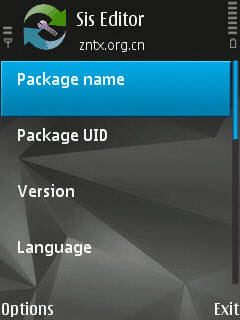
Specific features of the
software:
Cheers
READ MORE

Specific features of the
software:
- It Supports editing sis/sisx file basic information, such as program name, uid, created date,
program version, provider name,
language, target device, the type of
installation and so on. - Its Supports editing sis/sisx file list, including the program components can also be edited.
- Its Supports the new sis/sisx packages.
- It Supports exploring sis/sisx packages, extract, replace its
component, allow adding your files - It can do the following operations on sis/sisx files:
add, delete, replace, extract, property editing (can be four kinds of operation), moved up and down, etc. - It Supports cross-screen operation, you can better see the
specific path of the file. - The program language support, added 100.
- Goal-setting support for all 3rd and 5th edition of the model selection.
Including pre FP1,FP1,FP2, Newer
models as 5800xpress,X6, Sony
ericson, samsung, motorola. Support 5 kinds of the type of installation. - It Can delete certificate and signature
- It Has an inbuilt signer with 2 public certificate
Inserting Installation Pop-Up Text
If you want to insert any desired pop up installation text or installation instruction in file.- Simply open that file.
- Goto file list You will see so many application files here.
- Press left soft key and open options. Click on add, locate the text that you want to use as installation pop up.
- After adding text file, press left soft key and open options.
- Click on 'edit attribute' to set it as pop up text
- Select
- Operation : Display as Text
- Option : Continue button - Now you have added this text file as installation pop up text
- Now press back key, and save this file.
Before You Go
Every file you edit with SisEditor, will become unsigned, even if its signed. So if you don't want to face the issue, please hack your mobile.Cheers
Download
I saw so many Users complaining about Free iSMS registration problem. I myself was so upset about it, one day my brother told me that he is using iSMS and he didn't face Registration problem. So i suddenly thought why its happening to me only? I googled about it and saw so many people, i felt that i am not alone :). So i decided to do something by my own. I tried only one method and it worked.

Let me tell you what i did. I simply took my brother's mobile from him and copied two files from his mobile.
C: / Data / FreeiSMS / FreeiSMS_0xXXXXXXXX.dat
C: / Data / FreeiSMS / FreeiSMS_0xXXXXXXXX.db
XXXXXXXX can be different in different version of iSMS.

Then i sent both files to my mobile and i pasted both files in
C: / Data / FreeiSMS /
Then i opened Free iSMS > Options > Login

Then i tried to Register it with my mobile number or e-mail and i succeeded. Now i am so happy that i am still using it and i am loving it <3. Here is the proof, i mean preview of my iSMS.

This is the best Chinese application for SMS, it has so many features which are so unique and amazing. iSMS AllInOne Beta is a new and improved application with rewitten interface UI, chat conversations, resulting in a more smooth scrolling effect. Free-iSMS displays your messages in threads, it can schedule your messages, and it can send fake messages to your inbox too. The fake messaging option of Free-iSMS works much better than Fake Messages and ActiveFile. Let me tell you about features of new iSMS (beta).

It shows SMS in threaded view same as iphone shows. You can delete, reply, forward on the same place.

This application shows the Avatar of the SMS sender, you can set Avatar of your contacts from Menu > Contacts > Options > Set Image. Set desired image of the contact to show it in iSMS.

This application can show smiley in icon form, you can send so many amazing smileys in your SMS.

Free iSMS can restore your messages, you can create a backup of your messages, you can send message on any time with scheduled sms, you can send flash message, you can send fake sms, you can notify fake messages in your mobiles and much more.

Free iSMS support unlimited skins, you can download so many skins from internet. Even you can create you own skins (if you can :p).

Short Brief.
- Private Lock for SMS
- Stick favorite SMS on Top
- SMS Counter according to months
- New skin format support, more easily create a personalized love messages.
- Simplified skin production, installation and management functions, the skin used to choose the way coverflow, the skin effect of real time preview, dynamic presentation.
- Chat dialogue interface add a picture expression support, send messages to visualize bubble selection and insertion.
- Contact Interface Add “to add, clear picture” function, support jpg, png and other *** image formats, picture settings and contacts within the contact head independently, and supports batch import picture.
- Added functionality to ignore iPhone style tips: 3rd edition phones can be prompted by the # key closed, 5th Edition mobile phone users can click the upper right corner of the red cross tips off tips, but does not change the state of new information.
- For 5th Edition Touch platform, the contact interface, new gesture support: contact entries on the left in the program contacts the right plan can be labeled and unmark operation.
New Function:
- iSMS add fetion function, It will convenient for the user to use.
- iSMS support using fetion number to login fetion function.
- Auto start for fetion function:fetion function will auto start after you setting fetion configurations.
- Double click will insert expression on flatform Symbian S60 5th and Symbian^3.
User feeling optimization:
- Function of start-flash-screen in iSMS have been moved to "about" option.
New platform adaptation:
- Correct the problem that fetion function can't be used on platform Symbian^3.
- Correct the problem that when you connect to wap that ask you to choose access point many times on platform Symbian^3.
- Correct the problem that iSMS don't support secret contact person function on platform Symbian^3.
This application can work on these mobiles.
Nokia: Symbian S60 3rd full support
Like: 3250 / 3250XM / 5320XM / 5500 /5700 / 5700XM / 5730XM / 6110N /6120 / 6120C / 6121C / 6122C/6124C / 6210N / 6210S / 6220C /6290 / 6650 / E50 / E51 / E52 / E60 /E61 / E61i / E62 / E65 / E66 /E70 / E71 / E90 / N71 / N73 /N75 / N76 / N77 / N78 / N79 /N80 / N81 / N82 / N83 / N83i /N85 / N91 / N92 / N93 / N93i /N95 / N95 8GB / N96
Symbian S60 5th, Symbian ^ 3 full support
Like: 5230 / 5232 / 5233 / 5235 / 5250 /5530XM / 5800 /5800i / 5800w / 5802XM /C5-03 / C6 / N97 / N97i / N97 mini / X6 /C6-01 / C7 / N8
Samsung: S5200c、i400、G818E、L878E、i520、i458、M800 0、i560、i550、 i450、i408、SGH-i570、GT- B5210U、i7110、SGH-i408
READ MORE

It shows SMS in threaded view same as iphone shows. You can delete, reply, forward on the same place.

This application shows the Avatar of the SMS sender, you can set Avatar of your contacts from Menu > Contacts > Options > Set Image. Set desired image of the contact to show it in iSMS.

This application can show smiley in icon form, you can send so many amazing smileys in your SMS.

Free iSMS can restore your messages, you can create a backup of your messages, you can send message on any time with scheduled sms, you can send flash message, you can send fake sms, you can notify fake messages in your mobiles and much more.

Free iSMS support unlimited skins, you can download so many skins from internet. Even you can create you own skins (if you can :p).

Short Brief.
- Private Lock for SMS
- Stick favorite SMS on Top
- SMS Counter according to months
- New skin format support, more easily create a personalized love messages.
- Simplified skin production, installation and management functions, the skin used to choose the way coverflow, the skin effect of real time preview, dynamic presentation.
- Chat dialogue interface add a picture expression support, send messages to visualize bubble selection and insertion.
- Contact Interface Add “to add, clear picture” function, support jpg, png and other *** image formats, picture settings and contacts within the contact head independently, and supports batch import picture.
- Added functionality to ignore iPhone style tips: 3rd edition phones can be prompted by the # key closed, 5th Edition mobile phone users can click the upper right corner of the red cross tips off tips, but does not change the state of new information.
- For 5th Edition Touch platform, the contact interface, new gesture support: contact entries on the left in the program contacts the right plan can be labeled and unmark operation.
New Function:
- iSMS add fetion function, It will convenient for the user to use.
- iSMS support using fetion number to login fetion function.
- Auto start for fetion function:fetion function will auto start after you setting fetion configurations.
- Double click will insert expression on flatform Symbian S60 5th and Symbian^3.
User feeling optimization:
- Function of start-flash-screen in iSMS have been moved to "about" option.
New platform adaptation:
- Correct the problem that fetion function can't be used on platform Symbian^3.
- Correct the problem that when you connect to wap that ask you to choose access point many times on platform Symbian^3.
- Correct the problem that iSMS don't support secret contact person function on platform Symbian^3.
This application can work on these mobiles.
Nokia: Symbian S60 3rd full support
Like: 3250 / 3250XM / 5320XM / 5500 /5700 / 5700XM / 5730XM / 6110N /6120 / 6120C / 6121C / 6122C/6124C / 6210N / 6210S / 6220C /6290 / 6650 / E50 / E51 / E52 / E60 /E61 / E61i / E62 / E65 / E66 /E70 / E71 / E90 / N71 / N73 /N75 / N76 / N77 / N78 / N79 /N80 / N81 / N82 / N83 / N83i /N85 / N91 / N92 / N93 / N93i /N95 / N95 8GB / N96
Symbian S60 5th, Symbian ^ 3 full support
Like: 5230 / 5232 / 5233 / 5235 / 5250 /5530XM / 5800 /5800i / 5800w / 5802XM /C5-03 / C6 / N97 / N97i / N97 mini / X6 /C6-01 / C7 / N8
Samsung: S5200c、i400、G818E、L878E、i520、i458、M800 0、i560、i550、 i450、i408、SGH-i570、GT- B5210U、i7110、SGH-i408
Download It


